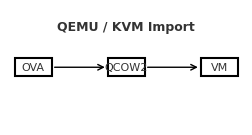
Import an OVA into QEMU/KVM

A reliable, step-by-step guide to bring a VirtualBox/VMware .ova into QEMU/KVM, with both GUI and CLI paths—and fixes for the most common pitfalls.Contents Prerequisites 1) Extract the OVA 2) Convert VMDK → QCOW2 3) Create the VM in virt-manager (GUI) 4) Alternative: virt-install (CLI) 5) Common gotchas & fixes Quick troubleshooting checklist Prerequisites QEMU/KVM, libvirt, and virt-manager installed on the host. User is allowed to manage libvirt (typically being in the libvirt/libvirtd and kvm groups). Enough disk space to hold the converted image (QCOW2). 1) Extract the OVA An OVA is a tar archive containing an .ovf (metadata) and one or more .vmdk disks. ...

September 2, 2025 · SarCoptU

Taming the Virtual Hydra: Troubleshooting VirtualBox on NixOS

What started as a quick VirtualBox install turned into a multi‑headed boss fight: USB errors, a sulking kernel driver, a turf war with KVM, and even a Nix syntax bite. Here’s the complete journey and the fixes that finally made my VM boot. Head #1 — USB devices wouldn’t enumerate Can't enumerate USB devices Could not load the Host USB Proxy service: VERR_NOT_FOUND Root cause: Host USB support + Extension Pack missing, and the user not in vboxusers. ...

August 24, 2025 · SarCoptU

NixOS Cheatsheet

If you’ve ever felt overwhelmed by NixOS commands, flakes, or the dreaded garbage collection panic, this guide is for you. It’s not just a cheatsheet—it’s a practical survival kit for running NixOS with flakes, keeping your system clean, and always having a rollback strategy when things go sideways. 🖥️ NixOS Essentials Task Command Show version nixos-version Edit config (classic) sudo nano /etc/nixos/configuration.nix Rebuild + switch sudo nixos-rebuild switch Build only (no switch) sudo nixos-rebuild build Roll back last rebuild sudo nixos-rebuild switch --rollback List generations sudo nix-env --list-generations --profile /nix/var/nix/profiles/system ⚡ Flakes Basics Task Command Init flake nix flake init -t templates#nixos Show flake outputs nix flake show Update all inputs nix flake update --commit-lock-file Update one input nix flake lock --update-input nixpkgs --commit-lock-file Build system sudo nixos-rebuild build --flake .#<hostname> Switch system sudo nixos-rebuild switch --flake .#<hostname> Boot (safe) sudo nixos-rebuild boot --flake .#<hostname> 🔄 Safe Updates & Rollbacks Keeping your system updated is great… until it doesn’t boot. Here’s how to avoid disasters. ...

August 24, 2025 · SarCoptU