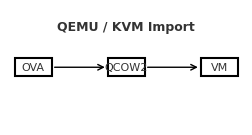
Import an OVA into QEMU/KVM

A reliable, step-by-step guide to bring a VirtualBox/VMware .ova into QEMU/KVM, with both GUI and CLI paths—and fixes for the most common pitfalls.Contents Prerequisites 1) Extract the OVA 2) Convert VMDK → QCOW2 3) Create the VM in virt-manager (GUI) 4) Alternative: virt-install (CLI) 5) Common gotchas & fixes Quick troubleshooting checklist Prerequisites QEMU/KVM, libvirt, and virt-manager installed on the host. User is allowed to manage libvirt (typically being in the libvirt/libvirtd and kvm groups). Enough disk space to hold the converted image (QCOW2). 1) Extract the OVA An OVA is a tar archive containing an .ovf (metadata) and one or more .vmdk disks. ...

September 2, 2025 · SarCoptU

Syncing Virtual Machines Over The Network with a NAS (SMB)

A simple, repeatable workflow for one VM image (Kali.qcow2), root-owned files, and an SMB share. Overview I run a Kali Linux virtual machine under QEMU/KVM and wanted to use the same VM across three different machines, while keeping a central backup on my NAS. The approach below keeps one master copy on the NAS and uses rsync to push updates from whichever host I used last and pull them on the next host. ...

September 2, 2025 · SarCoptU

Taming the Virtual Hydra: Troubleshooting VirtualBox on NixOS

What started as a quick VirtualBox install turned into a multi‑headed boss fight: USB errors, a sulking kernel driver, a turf war with KVM, and even a Nix syntax bite. Here’s the complete journey and the fixes that finally made my VM boot. Head #1 — USB devices wouldn’t enumerate Can't enumerate USB devices Could not load the Host USB Proxy service: VERR_NOT_FOUND Root cause: Host USB support + Extension Pack missing, and the user not in vboxusers. ...

August 24, 2025 · SarCoptU

NixOS Cheatsheet

If you’ve ever felt overwhelmed by NixOS commands, flakes, or the dreaded garbage collection panic, this guide is for you. It’s not just a cheatsheet—it’s a practical survival kit for running NixOS with flakes, keeping your system clean, and always having a rollback strategy when things go sideways. 🖥️ NixOS Essentials Task Command Show version nixos-version Edit config (classic) sudo nano /etc/nixos/configuration.nix Rebuild + switch sudo nixos-rebuild switch Build only (no switch) sudo nixos-rebuild build Roll back last rebuild sudo nixos-rebuild switch --rollback List generations sudo nix-env --list-generations --profile /nix/var/nix/profiles/system ⚡ Flakes Basics Task Command Init flake nix flake init -t templates#nixos Show flake outputs nix flake show Update all inputs nix flake update --commit-lock-file Update one input nix flake lock --update-input nixpkgs --commit-lock-file Build system sudo nixos-rebuild build --flake .#<hostname> Switch system sudo nixos-rebuild switch --flake .#<hostname> Boot (safe) sudo nixos-rebuild boot --flake .#<hostname> 🔄 Safe Updates & Rollbacks Keeping your system updated is great… until it doesn’t boot. Here’s how to avoid disasters. ...

August 24, 2025 · SarCoptU

Dual‑Boot: Windows 11 + NixOS (with Flakes)

For ages I wanted a clean dual‑boot between Windows 11 (for the few things that require it) and NixOS (for everything I actually enjoy). This is the full journey: GParted wizardry, fixing MBR/GPT issues, laying out a big EFI (because NixOS loves EFI space), and finishing with flakes. Step 1 — Disk Layout in GParted I booted a live USB with GParted and created the following: EFI System Partition (ESP): 1030 MB, FAT32, flags boot, esp Windows: 200 GB, NTFS Linux swap: 8 GB Linux root: rest of the disk (later Btrfs) Why a big ESP? NixOS + systemd‑boot keeps multiple generations of kernels/initrds. A tiny 100 MB ESP fills up fast. ...

August 23, 2025 · SarCoptU

SSH Connect to a Kali Virtual Machine in Virtualbox

Kali is a great learning tool for learning cybersecurity, especially the red-attacking side of it. For the longest time, I had trouble running the Kali VM on my rather old Thinkpad X1 Carbon, as the image consumes quite a few resources. There is a way to use most of Kali’s tools with little resource consumption: ssh into the image via your distro terminal. It turns out it’s quite easy to set this up in VirtualBox, as described in this article: ...

January 13, 2024 · SarCoptU

Make Debian 12 Pretty and Useful

There are a few customisations I have come to love on the personal Debian install. This blog post is meant to describe the steps for my ideal (at this point) Debian 12 post-installation cleanup and provide a few security applications for everyday use and a few programs for light security work. Download and Install Debian 12 Download the DVD version for 64-bit PC architecture from here: https://cdimage.debian.org/debian-cd/current/amd64/iso-dvd/ Installation-wise, I chose to install the Gnome and nothing else: ...

November 27, 2023 · SarCoptU

Raspberry Pi NAS with Open Media Vault and Plex

Ingredients: Raspberry pi 4 – I used one with 8Gb of RAM with whatever case is available 1 or 2 external hard disk drives (HDDs) – if 2 are used, a powered USB hub is required, as the pi does not provide enough power for more than 1 HDD of note also, no RAID configurations are possible with external, USB connected HDDs USB microSD card adaptor for installing Raspberry Pi OS raspberry pi power plug cables: USB for HDDs, internet cable with RJ45 plugs Ingredients Step 1: Install Raspberry Pi OS Download the Raspberry Pi imager from https://www.raspberrypi.com/software/ and select the image to be installed on the Pi. ...

January 31, 2022 · SarCoptU

Xubuntu with AwesomeWM

After some looking about and being sick of running Windows 10 just for doing some Scratch-like programming for uni, I have decided to update my system to full a Linux pc with, if needed Win10 and Kali VMs for all my HackTheBox and TryHackMe needs. Because I still don’t have proper internet and using phone internet sharing, installing arch without some cable internet is a bit of a stretch. After seeing some Debian-Titus work in progress during ChrisTitusTech stream, I definitely want to give AwesomeWM a try. What’s not to like about a small, quick and efficient window manager. ...

December 15, 2021 · SarCoptU

Tweaks on Home Computer (Mostly GNU/Linux)

I have some peculiarities for my desktop setup that I use every time I reinstall a new OS. So instead of researching how to do the setup all over every time I reinstall an OS, dual boot, or distro hop, I will throw them all in a blog post and save some keystrokes and a bit of time. On my main computer, an old Dell Optiplex, with an NVIDIA GTX1650, I am dual-booting Kubuntu 20.04 and Windows 10. ...

May 23, 2021 · SarCoptU